
AI automation services help businesses reduce manual work by combining artificial intelligence, software integrations, and automated workflows to complete or support repetitive processes. AI interprets information such as emails, documents, and requests, while automation updates systems, routes tasks, and sends follow-ups.
For example, instead of reading every sales enquiry and typing its details into a CRM, AI identifies what the customer needs and automation creates the record and assigns it to the right salesperson.
This guide explains how AI automation works, where it saves the most time, when simple automation is enough, and how to estimate the return.
What Are AI Automation Services?
AI automation services design, build, and run workflows that combine AI with automation technology. Traditional automation follows fixed rules. AI adds the ability to read unstructured inputs, such as an email, an invoice in any layout, or a support message, and decide what should happen next.
A traditional automation sends a confirmation email after a form is submitted. An AI-enabled workflow also reads the message, identifies the service needed, and routes it to the right team.
Common AI automation services include:
• AI workflow automation: connecting systems and automating processes across departments
• Document processing: extracting data from invoices, forms, and contracts
• Customer support automation: classifying enquiries and drafting answers from approved information
• Sales and CRM automation: capturing leads, updating records, and scheduling follow-ups
• Custom AI automation: workflows built around specific systems or requirements
The goal is to remove unnecessary manual effort while keeping people in control where accuracy or approval matters.
Why Does Manual Work Slow Down Operations?
Manual work slows operations because employees repeat the same steps across disconnected systems, and the workload grows with every new customer, invoice, or request.
A single enquiry arriving by email might require someone to read it, enter the contact in the CRM, decide which team handles it, assign it, and send a follow-up. At 20 enquiries a week that is manageable; at 200 it becomes a bottleneck.
The same pattern appears across departments:
• Sales: entering leads and updating customer records
• Finance: copying invoice details and reconciling records
• HR: chasing onboarding documents and answering policy questions
• Support: categorising tickets and searching for answers
• Operations: tracking approvals, updating spreadsheets, and sending reminders
These tasks are strong automation candidates because they are frequent and follow recognizable steps.
How Does AI Workflow Automation Work?
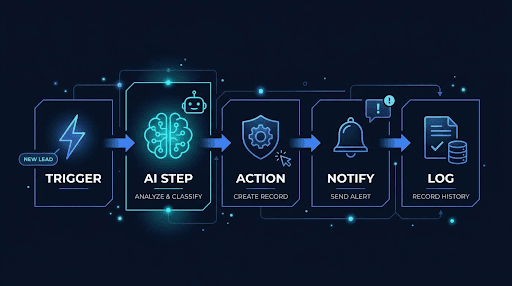
AI workflow automation moves information through a process in five stages: a trigger starts the workflow, the system collects data, AI interprets it, automation takes action, and people review exceptions.
1. Trigger: a new email, form, document, or request starts the workflow.
2. Collect: the workflow gathers data from the request and connected systems.
3. Interpret: AI extracts details, identifies the request type, or summarises content.
4. Act: automation updates records, assigns tasks, or sends notifications.
5. Review: unclear, incomplete, or sensitive cases go to an employee.
Example: Automating an Incoming Sales Enquiry
1. A customer sends an enquiry by email or web form.
2. AI identifies the customer’s requirements, budget, and urgency.
3. The CRM record is created or updated automatically.
4. The enquiry is assigned to the right salesperson.
5. A follow-up task is created with a due date.
6. Unclear enquiries are flagged for a person to review.
Only step 2 needs AI. Steps 3 to 5 are conventional automation. Using AI only where interpretation is needed keeps workflows cheaper and more reliable.
Where Does AI Automation Save the Most Time?
AI automation saves the most time in sales, customer support, finance, HR, and operations, wherever teams repeatedly read, sort, or re-enter information.
| Department | Manual process | AI-automated process | Typical benefit |
| Sales and CRM | Read enquiries, copy details into the CRM, assign follow-ups | AI classifies enquiries; workflow updates the CRM and creates tasks | Faster lead response, less data entry |
| Customer support | Answer repeat questions, search for information | AI drafts answers from an approved knowledge base and escalates complex cases | Faster replies, more time for complex issues |
| Finance | Open invoices, type details into accounting software | AI extracts supplier, date, and amount; mismatches go to review | Less manual entry, more consistent records |
| HR onboarding | Send documents, chase forms, answer policy questions | Workflow sends materials and reminders; assistant answers routine questions | Consistent onboarding, fewer interruptions |
| Approvals | Email requests and follow up repeatedly | Workflow routes to the approver, logs decisions, sends reminders | Clear visibility of pending requests |
Two safeguards apply across all of these. Customers should always have a clear route to a person, and financial approvals and payments should keep human sign-off.
What Are the Benefits of AI Automation Services?
The main benefits of AI automation are less repetitive work, faster processing, fewer data-entry errors, more consistent workflows, and more capacity without adding staff.
• Less repetitive work: routine data transfers, records, and notifications run automatically.
• Faster processing: information moves between systems without waiting for someone to copy it.
• Fewer copying errors: automated transfers avoid retyping mistakes, though AI outputs still need validation.
• Consistency: the same rules route and record every request.
• More capacity: teams handle higher volumes without a matching rise in manual effort.
The evidence supports the people’s side too. In an OECD survey of more than 5,000 SMEs, 65% of those using generative AI said it improved employee performance, and about a third said it reduced staff workload.
AI Automation vs. Traditional Automation: Which Should You Use?
Use traditional automation for predictable, rule-based tasks, and AI automation when a workflow must interpret text, documents, or other inputs that do not follow a fixed format. Most businesses get the best results by combining both.
| Factor | Traditional automation | AI automation |
| Main capability | Executes predefined rules | Interprets information and supports decisions |
| Best for | Structured, predictable tasks | Language, documents, variable inputs |
| Example | Send an email after a form submission | Read an enquiry and categorise its requirements |
| Output | Predictable for defined inputs | Can vary and needs validation |
| Key consideration | Rules and integrations | Data quality, accuracy, and oversight |
If employees mainly move structured data between systems, traditional automation is usually enough. If they spend significant time reading and interpreting messages or documents, AI adds real value.
How Do You Know If a Workflow Needs AI Automation?
A workflow is a good candidate for AI automation when it happens often, takes meaningful staff time, and involves reading or interpreting unstructured information before taking routine actions.
Common signs:
• Staff spend hours reading and sorting incoming messages.
• Information is retyped between several systems.
• Customer responses wait on administrative work.
• Large volumes of documents need manual data extraction.
• People repeatedly search for the same internal answers.
Before automating, check five things:
1. How often does the task occur?
2. How much time does it take today?
3. Does it involve unstructured text or documents?
4. Can your existing software already automate part of it?
5. How much accuracy and human oversight does it need?
If the process itself is unclear or inconsistent, fix the process first. Automating a messy workflow only makes the mess faster.
How to Calculate AI Automation ROI
To estimate AI automation ROI, multiply how often a task happens by the manual time it takes, estimate the time automation would save, and compare that value with setup and running costs.
Illustrative example: a business handles 500 enquiries a month, spending four minutes on each for classification and data entry.
| Measure | Calculation | Result |
| Current manual time | 500 × 4 minutes | 33.3 hours per month |
| Time after automation | 500 × 1 minute (review only) | 8.3 hours per month |
| Time freed | 33.3 − 8.3 | 25 hours per month |
This is an illustration, not a guaranteed saving. Real ROI also depends on software and usage fees, maintenance, accuracy, and whether the free time is used productively. Measuring matters: McKinsey’s 2026 State of AI survey found only 37% of organisations attribute any EBIT impact to AI, so track results against a baseline rather than assume them.
For a full breakdown of setup versus ongoing costs, pilots, and choosing a provider, also see our guide to AI services for small businesses. (add link)
What Are the Risks of AI Automation?
The main risks of AI automation are incorrect AI outputs, poor data quality, integration limits, privacy exposure, workflows breaking when systems change, and low employee adoption.
• Incorrect outputs: AI can misread a request or extract the wrong value.
• Poor data: inconsistent records make workflows unreliable.
• Integration limits: some systems do not allow the access automation needs.
• Privacy and security: customer data needs proper permissions and handling.
• Process changes: workflows need updating when software or rules change.
• Adoption: staff need clear instructions for handling exceptions.
Automation-specific safeguards include confidence thresholds that send uncertain AI outputs to review, logs of every automated action, and alerts when a workflow fails. The NIST AI Risk Management Framework is a practical reference for governing and monitoring AI risk, and regulators such as the ICO publish guidance on using AI with personal data.
How Falcon Reality Helps Businesses Implement AI Automation
Falcon Reality builds AI automation inside the tools teams already use, starting with one workflow and expanding once results are measured. Recent work includes:
• Contract preparation: for Howe Robinson Partners, document reviews, clause checks, and formatting were rebuilt into a standard workflow, cutting charter-party drafting time from 8 hours to 4.
• Video production: for ISF, a manual process became a repeatable workflow, cutting production cost per minute by about 87.5%.
• Marketing operations: built Mizo, planning, creation, scheduling, and tracking were combined into one workflow, so one brief now produces 30 days of content.
Looking to reduce manual work in your business? Talk to Falcon Reality to find the workflow where automation will make the biggest difference first.
We work on sales and CRM automation, customer support and knowledge assistants, document processing, approval workflows, and custom AI automation.